GDScript commenter plugin
A downloadable tool
GDScript Commenter, Godot 4 Plugin
A Godot 4 editor plugin that inserts and updates GDScript documentation comment templates directly from the native script editor context menu.
Place the cursor anywhere inside or on a declaration, right-click, and choose Insert Comment (or Update Comment if one already exists). The plugin detects the declaration type automatically and generates the correct ## docstring, including parameter names, types, return type, enum members, and class name, all in Godot BBCode format ready for the built-in documentation viewer.
✨ Features
- Keyboard shortcuts -- press Shift+F1 anywhere in the script editor to insert or update a comment instantly, or Ctrl+Shift+F1 to insert a section separator, without opening the context menu
- Customizable shortcuts -- both shortcuts can be remapped from Editor Settings, see Customizing shortcuts below
- Single smart menu entry -- one action covers all declaration types
- Auto-detection from cursor line -- identifies
func,var/const/@export/@onready,enum, class header (@tool/class_name/extends), or falls back to a plain line comment - Multi-line block support -- if the cursor is inside a
funcorenumbody, the plugin walks upward to find the opening keyword; multi-line signatures (parameters or braces spread across lines) are fully parsed - Insert or Update -- the label shows
Insert CommentorUpdate Commentwith the detected type in brackets, so you always know what will happen before clicking - Smart merge on update -- existing description texts are preserved; parameters are added, removed, or kept in sync with the current signature; the return description is kept only when the return type is unchanged; enum members follow the same rules
- Real class name -- uses the
class_namedeclaration when present, falls back to the filename in PascalCase - Section separator -- a second entry inserts a visual
# ---divider with a placeholder title - Godot BBCode -- output uses
[param],[return],[br],[b],[code],[codeblock]for full compatibility with the Godot documentation viewer
📦 Installation
- Copy the
addons/gdscript_commenter/folder into your project'saddons/directory. - Open Project → Project Settings → Plugins.
- Enable GDScript Commenter.
🚀 Usage
- Open any
.gdfile in the script editor. - Place the cursor on the declaration line, or anywhere inside a
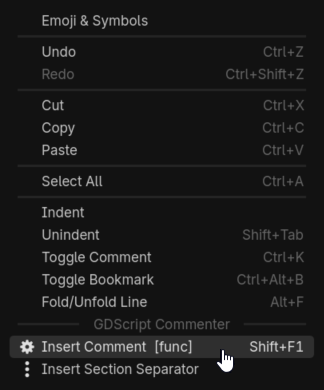
funcorenumbody. - Press Shift+F1, or right-click and choose Insert Comment / Update Comment from the GDScript Commenter section.
The label in the context menu shows the detected type and the keyboard shortcut before you click:
─── GDScript Commenter ──────────────────────
  Insert Comment  [func]          Shift+F1
  Insert Section Separator        Ctrl+Shift+F1
⌨️ Customizing shortcuts
Two shortcuts are registered by the plugin:
| Action | Default |
|---|---|
| Insert / Update Comment | Shift+F1 |
| Insert Section Separator | Ctrl+Shift+F1 |
Godot 4.6 and later -- both shortcuts appear in Editor Settings → Shortcuts, under the Gdscript Commenter category, as Insert/Update Comment and Insert Section Separator. Remap them like any other built-in editor shortcut.
Godot 4.2 -- 4.5 -- on these versions the native Shortcuts tab isn't extensible, so the plugin falls back to two Shortcut-typed settings in Editor Settings → General, under gdscript_commenter/insert_comment_shortcut and gdscript_commenter/insert_section_separator_shortcut. Click the setting's resource field to assign a new InputEventKey.
The context menu label and shortcut hint always reflect whatever is currently configured, so there's nothing else to keep in sync after remapping.
📝 Output examples
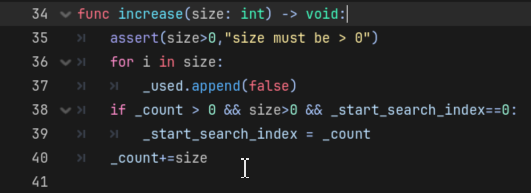
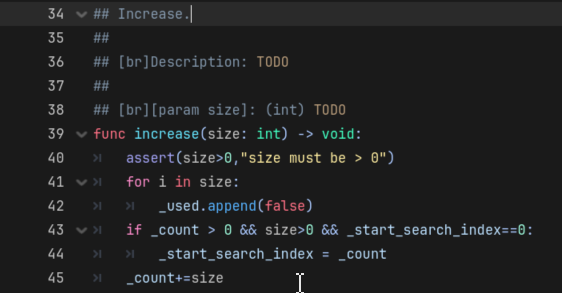
func
## calculate_damage.
##
## [br]Description: TODO
##
## [br][param attacker]: (Node) TODO
## [br][param weapon]: (Item) TODO
## [br][param multiplier]: (float) TODO
##
## [br][return] (int): TODO
func calculate_damage(attacker: Node, weapon: Item, multiplier: float = 1.0) -> int:
Multi-line signatures are fully supported:
func calculate_damage(
        attacker: Node,
        weapon: Item,
        multiplier: float = 1.0
) -> int:
var / const / @export / @onready
## speed_multiplier.
##
## [br]Exported variable — TODO: description.
## [br]Type: [float]
## [br]Default: [code]1.0[/code]
@export var speed_multiplier: float = 1.0
enum
## Toto.
##
## [br]Description: TODO
##
## [br]Members:
## [br]- [b]a[/b]: TODO
## [br]- [b]b[/b]: TODO
## [br]- [b]c[/b]: TODO
enum Toto { a, b, c }
Enum members follow the exact casing from the code. Multi-line enums and single-line enum Name { ... } are both handled.
class header
First insertion -- the class name is read from class_name and injected automatically:
## PlayerController.
##
## [br]Description: TODO
##
## [br]Usage:
## [codeblock]
## var obj = PlayerController.new()
## [/codeblock]
@tool
class_name PlayerController
extends CharacterBody2D
After filling in the description and running Update Comment:
## PlayerController.
##
## [br]Description: Manages player movement, input, and health.
##
## [br]Usage:
## [codeblock]
## var obj = PlayerController.new()
## [/codeblock]
@tool
class_name PlayerController
extends CharacterBody2D
Filename fallback -- when no class_name is declared, the filename is converted to PascalCase:
## AudioSpectrumViewer.
##
## [br]Description: TODO
##
## [br]Usage:
## [codeblock]
## var obj = AudioSpectrumViewer.new()
## [/codeblock]
# file: audio_spectrum_viewer.gd  (no class_name declaration)
extends Control
The comment is always inserted above the header block (@tool, class_name, extends). On update, the class name is resynchronised automatically, useful after renaming the class.
line comment (fallback)
# TODO: describe what this line does
some_unrecognised_line()
section separator
# ---------------------------------------------------------------------------
# SECTION NAME
# ---------------------------------------------------------------------------
🔍 Update / merge rules
When a docstring already exists above a declaration, the plugin rebuilds it from the current signature and re-injects the text you previously wrote:
| Element | Behaviour |
|---|---|
| Description | Existing text is always preserved |
[param] |
Kept with its description if the parameter still exists; dropped if removed; added as TODO if new |
[return] |
Description preserved only when the return type is unchanged; reset to TODO if the type changed |
| Enum members | Same rules as [param], kept, dropped, or added as the enum body changes |
| Variable description | Existing text is preserved |
| Class name | Always updated to the current class_name or filename, useful after renaming |
| Line comment | If a comment already exists above the line, nothing is done |
⚙️ Compatibility
- Godot Engine 4.x (tested on 4.2+)
- GDScript files only
📄 Licence
MIT, free to use, modify and distribute.
📑Project repository
https://codeberg.org/quanty-bandit/Gdscript-commenter-plugin
🧾Release Note:
version 1.0.9
1. Improve shortcut management
version 1.0.6
- Add comment on signal
version 1.0.4
- Add shortcut customization in Godot Editor/Settings
Download
Click download now to get access to the following files:
Leave a comment
Log in with itch.io to leave a comment.