GDScript refactoring plugin - 1.0.9
A downloadable tool
GDScript Refactoring — Godot 4 Plugin
A scope-aware refactoring plugin for the Godot 4 script editor, powered by Godot's built-in GDScript Language Server (LSP), the same engine that drives autocompletion and go-to-definition. It adds two tools to the editor:
- Rename a symbol (variable, function, class…) across your whole project.
- Find all references to a symbol, listed in a dockable panel you can click to jump straight to the code.
Unlike naive find-and-replace, both tools understand GDScript semantics: renaming or searching a member variable will not touch an unrelated local variable that happens to share the same name, and vice versa.
✨Features
Rename
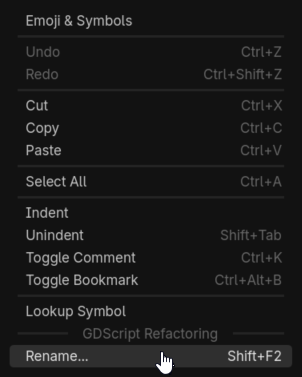
- Shift+F2 (or right-click → Rename...) directly in the script editor, on any user-defined symbol (variable, function, parameter, class, enum member…). The shortcut is customizable (see Customizing the shortcuts below).
- Scope-aware: powered by
textDocument/renamefrom Godot's own language server, shadowed or unrelated symbols are left untouched - Project-wide: all
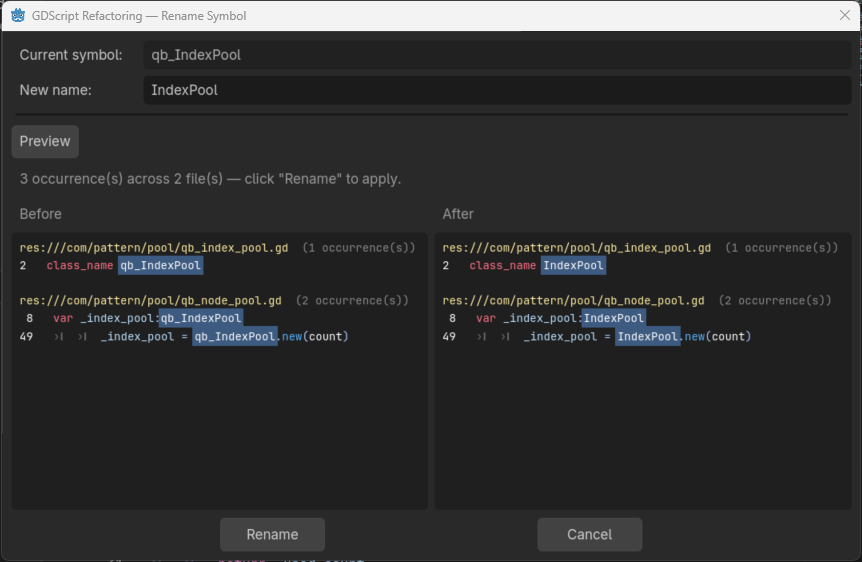
.gdfiles are analyzed and updated in one action - Preview before applying: every affected file, line number, and line content is listed (with the symbol highlighted) before anything is written
- Multi-file undo/redo: a single Ctrl+Z reverts the rename across all modified files; Ctrl+Shift+Z (or Ctrl+Y) re-applies it. Your own local edits are still undone first, like in any IDE
- Unsaved-changes guard: if any open script has unsaved edits when you open the dialog, a warning lists the affected files and a Save modified files button lets you save them in one click before renaming
- Silent editor refresh: open script tabs reload automatically, no "files are newer on disk" popup, caret and scroll position preserved
Find all references
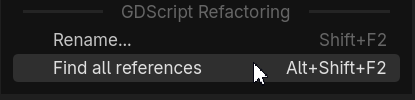
- Alt+Shift+F2 (or right-click → Find all references) on any user-defined symbol
- Opens a dockable References panel at the bottom of the editor (next to Output / Debugger)
- Every usage is listed, grouped by file, with syntax-colored source lines and the occurrence highlighted, just like the rename preview
- Click any line to jump straight to that file at the exact position
- The shortcut is customizable (see Customizing the shortcuts below)
Both tools
- Smart context menu: the Rename... and Find all references entries only appear when the cursor is on a usable symbol, never on keywords, built-in types (
Vector2,String…), native engine classes (Node,Sprite2D…), numbers, strings, or comments - Cross-platform paths: file URIs from the language server are resolved correctly on Windows, Linux, and macOS
📦Installation
- Copy the
addons/gdscript_refactoring/folder into your project'saddons/directory. - Open Project → Project Settings → Plugins.
- Enable GDScript Refactoring.
Requirement: the GDScript language server must be running (it is enabled by default in the Godot editor, on port 6005, see Editor Settings → Network → Language Server).
🚀Usage
Renaming a symbol
- In the script editor, place the caret on the symbol you want to rename.
- Press Shift+F2 (customizable, see below), or right-click → Rename.... The shortcut and the menu entry only activate on renameable symbols.
- Type the new name.
- Click Preview, all occurrences across the project are listed with file, line number, and highlighted line content.
- Click Rename to apply.
To revert: press Ctrl+Z in the script editor. All modified files are restored in one step. Ctrl+Shift+Z / Ctrl+Y re-applies the rename.
Finding all references
- Place the caret on the symbol you want to inspect.
- Press Alt+Shift+F2 (customizable, see below), or right-click → Find all references.
- The References panel opens at the bottom, listing every usage grouped by file, with syntax-colored lines.
- Click any line to open that file in the editor at the exact position.
Customizing the shortcuts
On Godot 4.6 and later, both shortcuts appear in the native Shortcuts tab: open Editor → Editor Settings → Shortcuts, find the Gdscript Refactoring category, and rebind Rename Symbol (default Shift+F2) or Find all references (default Alt+Shift+F2).
On older versions, the rename shortcut falls back to a setting under Editor → Editor Settings → Gdscript Refactoring → Rename Shortcut.
Note: if you clear a shortcut completely, it is restored to its default the next time the plugin loads (an empty shortcut can never fire). To disable one, bind it to a different key instead.
Note: in the settings list (fallback case), the Gdscript Refactoring category only appears when Advanced Settings is enabled (toggle at the top-right of the Editor Settings window). This does not apply to the Shortcuts tab.
🔍How it works
| Step | Mechanism |
|---|---|
| Symbol detection | Word under caret + keyword / native-class / string / comment filtering |
| Occurrence search | textDocument/rename request to Godot's LSP (port 6005) |
| File sync to LSP | didClose + didOpen with monotonically increasing versions, drained socket buffers to avoid TCP deadlock |
| Applying edits | The LSP WorkspaceEdit (precise line/character ranges) is applied bottom-to-top to each file |
| Editor refresh | Temporary auto_reload_scripts_on_external_change + filesystem notification + simulated window-focus check (the same mechanism Godot uses to detect external file changes) |
| Undo / redo | Plugin-internal multi-file stack; Ctrl+Z is intercepted in the CodeEdit only when its local history is empty |
📂File structure
addons/gdscript_refactoring/
├── plugin.cfg               # Plugin manifest
├── qb_gdscript_rename.gd    # EditorPlugin, context menu, undo stack, shortcuts
├── qb_rename_dialog.gd      # Rename dialog, preview, apply, editor refresh
├── qb_lsp_client.gd         # Minimal LSP client (JSON-RPC 2.0 over TCP)
├── qb_file_scanner.gd       # Recursive .gd file collector
└── qb_symbol_replacer.gd    # Legacy regex engine (kept for reference)
Limitations
- GDScript only (not C#).
- The rename relies on Godot's language server: symbols it cannot resolve (e.g. purely dynamic access via strings,
get()/set()calls) will not be found. - References inside
.tscnscene files (connected signals, exported node paths) are not updated, use Godot's built-in tools for those.
⚙️Compatibility
- Godot 4.x (developed and tested on 4.6)
📄 Licence
MIT, free to use, modify and distribute.
📑Project repository
https://codeberg.org/quanty-bandit/Gdscript-refactoring-plugin
🧾Release Note:
Version 1.0.9
Improvements
- Property-access references. Find all references now handles property accesses like
velocity.y: it returns only the self-accesses within the class and its related classes, filters out unrelated.ymembers on other objects, and reports the number of externalobj.velocity.yaccesses that can't be resolved by type. - Full access path from any segment. Placing the caret on any part of a chained access (e.g.
velocityinvelocity.length) now searches the whole path, not just the segment under the caret. - Native members protected from rename. Native properties are no longer renameable:
- inherited node properties (
velocity,position,rotation,scale,transform, …) are blocked everywhere, even when used alone; - value components (
x,y,z,length, …) are blocked when used as a property access, while a standalone user variable of the same name stays renameable.
- inherited node properties (
- References still available on native members. Even though native members can't be renamed, Find all references remains available on them, searching the self-accesses of that property on the current object.
Fixes
- Fixed a parse error that prevented the plugin from loading (an untyped local variable in the shortcut handler).
Version 1.0.8
Improve URI file path decode to manage all utf8 character to fix the no code line displayed in References panel.
Version 1.0.7
Find references improvement:
1. Smart filtering of virtual methods (class + subclasses) with detection of .new() calls for _init
2. Context menu: Copy / Select All (like the Output pane)
Version 1.0.6
1. Add Find references feature
2. Improve shortcut management
version 1.0.4
- Fix Do/Undo issue
version 1.0.3
- Add shortcut customization in Godot Editor/Settings
Download
Click download now to get access to the following files:
Development log
- GDScript Refactoring 1.0.93 days ago
- GDScript Refactoring 1.0.711 days ago

Comments
Log in with itch.io to leave a comment.
Ps: The codeberg link points to the wrong project.
Oops!
Thank you, it's fixed now ;)
Cool! Will test this right away.
I am impressed. The find references and rename work like a charm.
This is such a missing core feature. Thank you for making an addon that provides this!